
Thursday, February 10, 2011
How to see if anyone else is logged into your Facebook account
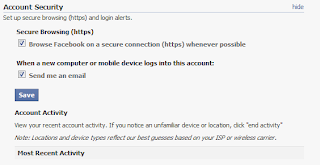
Facebook lets you check the location of your most recent account activity. You might be surprised to find that your account is logged on somewhere that you haven't been. Luckily you can disconnect any unknown connections. To do this you need to go to Facebook and click on 'Account Settings' in the upper right corner of the screen. Then on the 'Settings' tab, click 'change' next to the account security section. Then if you see an unfamiliar device or location, click "end activity". You can then set it up so that Facebook will send you an email when a new device logs on.

How to activate the admin account in Windows 7
To remove certain programs and to do certain tasks you may occasionally need to use the admin account in Windows 7. It is disabled by default so to to enable the built-in Administrator's account by using the Command Prompt follow these steps:
1. Click Start and type CMD, then right-click CMD and select "Run as Administrator".

2.) When prompted to allow the Command Processor to run, click on "Yes".
3.) Type the following into the command prompt window to enable the Administrator's account:
net user administrator /active:yes

The next time you restart you will see the option to log on as the administrator.
The end of Guitar Hero
Activision, the maker of Guitar Hero, has decided to discontinue making the game. Check out the story: [digitaltrends]
Wednesday, February 9, 2011
iPhone app sale!

Lots of apps have are on sale for 99 cents. The list includes FIFA, Madden, The Sims, and Prince of Persia. See more of the reduced price apps at [cnet].
Tuesday, February 8, 2011
Windows won't let you delete a file? Use the command prompt.
If you’ve ever seen the error message that you can’t delete a file because it’s currently in use, it is still possible to delete that file. There’s a way to delete it through the command prompt using the following steps (in Windows 7):
1. Type ‘cmd’ into the search bar and then right-click on ‘cmd.exe’ and choose ‘Run as Administrator’.

2. Go to the folder you want to delete a file from. Click on the Address-field to reveal the actual folder path.
3. Highlight the portion of the path after the Colon (:).
4. Right-Click the highlighted part, and choose Copy (or Press Ctrl+C).
5. Go back to your Command-Window and type: ‘CD\’ (This will open the Root Folder).
6. Paste in the path using Right-Click, Paste (Ctrl+V will NOT work).
7. To make sure you are in the correct folder you can type: ‘DIR’. This will show you the folder contents.
8. To delete the file, type: ‘DEL[filename] /F /Q’.
The F means: Delete File even IF it’s reported as Read Only.
The Q means: you don’t have to Confirm.
If you want to delete all files in the folder, you can use wildcards instead of Filename
For example: DEL *.* /F /Q
The F means: Delete File even IF it’s reported as Read Only.
The Q means: you don’t have to Confirm.
If you want to delete all files in the folder, you can use wildcards instead of Filename
For example: DEL *.* /F /Q
Last.fm to charge for mobile app
Starting February 15, 2011, Last.fm is introducing a charge for the streaming functions in its mobile app. The Web and desktop versions of the radio will still be free. It will also be free on Xbox Live and Windows Phone 7 phones.
Read more: [cnet]
Monday, February 7, 2011
Picasa is awesome!
So I just started using Picasa this weekend and it’s totally awesome. I know it’s been around for a while but I never really did much with my pictures after putting them on my computer. I was so impressed by the facial recognition feature. I was starting to think that it was magic until it asked me the name of this person.

Still love the software though!
Subscribe to:
Posts (Atom)
