If the PrtScn button and the Snipping Tool aren’t enough for you, check these out: eHow
Wednesday, March 16, 2011
Free Print Screen Tools

Sunday, March 13, 2011
Extend the Microsoft Office 2010 Trial to 180 days
You can get Microsoft Office 2010 free for up to 180 days. Check it out: eHow
Saturday, March 5, 2011
Want to hear people's real opinions?
Honestly Now is a new web/iOS app that you can use to ask your friends or the whole Honestly Now community for their anonymous opinion. MSNBC
What are 4G phones?
If you really aren't sure what the difference between 4G and 3G is check this out:
What are 4G phones?
What are 4G phones?
Thursday, March 3, 2011
iOS 4.3 Coming
iOS 4.3 is set to release March 11, 2011 and will be featuring Apple AirPlay enhancements, Safari updates that will allow faster JavaScript, and the capability of a personal hotspot for iPhone 4. http://www.apple.com/ios/
How to learn Access 2002
If you need to learn Access 2002 it may be a bit more challenging than trying to learn the current Access version since resources are becoming more difficult to find. There are still ways out there to learn it though: http://www.ehow.com/how_8008619_learn-access-2002.html
Monday, February 28, 2011
WinDirStat
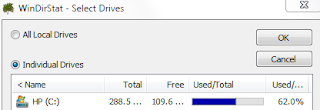
Is your hard drive full? Do you know why? Sometimes one of the hardest parts of freeing up space on your computer is figuring out exactly what is taking up all of that space in the first place. That's where WinDirStat can help. It's a free program and you can download it at: cnet. Here's how to use it:
1.) Install WinDirStat or open it if it's already installed.
2.) Select the drive that you want to analyze.

 4.) To go to the folder location click it once in the graphic and press Ctrl+E.
1.) Install WinDirStat or open it if it's already installed.
2.) Select the drive that you want to analyze.


3.) After the graphic pops up if you hover over one of the boxes it will tell you the name of the file at the bottom left corner of the window.

Video chat on Facebook with SocialEyes
SocialEyes has launched a new service that allows Facebook users to connect one-on-one via video. It's possible to connect with friends or with other people in communities that you share interests with. Get the app at socialeyes.com or apps.facebook.com/socialeyes.
Free unlimited storage of small photos with Picasa
Picasa no longer counts files under 800 pixels wide or videos less than 15 minutes long. See the article: [lifehacker]
Saturday, February 26, 2011
Adding Excel tables to Word
If you’ve ever needed to copy an updated table from Excel into a Word document you might have wished there was a way to automatically update both copies at once. Or if you’ve ever tried inserting a table in word using the quick table you know it just isn’t the same as all of the features available in Excel.
Creating a dynamic link between an Excel spreadsheet and Word
It is possible to link the table so that when you updated it in Excel, it concurrently updates in Word. You can select a few cells, a table or an entire worksheet. Just copy what you wish to insert and then open the Word document. The next step may vary depending on which version of Microsoft office you have. If you are working with Office 2007 or 2010, you can click the arrow button under the Paste button in the ribbon to locate it. If you’re unsure of where the ribbon is located, check out this picture from About.com: Paste. Then, once in paste special, select Paste link and the documents will now be linked. Note: In Office 2010 there is a button for linking that you can click after selecting the arrow button under Paste. The next time the Excel sheet is updated the Word document will be updated as well. If you insert an entire worksheet you will need to double-click the Excel object to display the next worksheet as it will only display one at a time. When you open a document that contains linked objects, Word will prompt you to update the document. It is also possible to break the link at a later time if it is no longer needed. To break the link in Office 2007, go to the Microsoft Office Button, then hover over Prepare and then click Edit Links to Files. Once in Edit Links to Files, click the link that you want to disconnect and click the Break Link button. In Office 2010, you can highlight the table and right-click on it. Then select Links. In the window that opens up, select your table and click the Break Link button.
Creating a static Excel table within Word
If you don’t need to link a table and just want to create a table for Word you don’t need to open up Excel. There are a few ways to go about adding a table and it depends on what type of table you which to create. Word has a quick table feature but it doesn’t contain any special features. To use this, in Office 2007 and 2010, go to Insert on the Ribbon and then select the arrow below Table there boxes that you can select the size of your table with or you can use the Insert Table… button. You can also see the following link from About.com on how to insert quick tables: tables. It is also possible to create an Excel formatted spreadsheet in Word as well. In Office 2007 and 2010, if you go to Insert on the Ribbon and then select the arrow below Table there is an Excel Spreadsheet button that will create a spreadsheet where your cursor is. This option will look very similar to working with an Excel spreadsheet in the Excel program but it isn’t linked directly to another file.
Thursday, February 24, 2011
Search inside Gmail attachments with Attachments.me
Gmail's search is great unless you want to find an attachment. That’s where Attachments.me comes in. If you sign up for an account, you can search your Gmail by content of an attachment. Check out a video of it in action and get an invite code here.
Want to make something with just the stuff in your kitchen? Try this.
Google now has a recipe search engine that you can find recipes with using just some ingredients. There are many other ways you can search for a dish such as calorie content, occasions, and type of food. Then you can further subcategorize results with prep time, ingredients, or calories. It will also show recipe ratings. [wired]
Tuesday, February 22, 2011
How to completely uninstall iTunes
iTunes isn't one of the easiest programs to uninstall but when it needs to be done, you can use the following directions.
Use the Control Panel to uninstall iTunes and related software components in the following order:
You can then reinstall or leave it uninstalled.
Use the Control Panel to uninstall iTunes and related software components in the following order:
- iTunes
- QuickTime
- Apple Software Update
- Apple Mobile Device Support
- Bonjour
- Apple Application Support (iTunes 9 or later)
- Restart your computer.
- After the computer restarts, open Local Disk (C:) located in Computer or whichever hard disk your programs are installed on.
- Open the Program Files folder.
- Right-click the iTunes folder, choose Delete, and choose Yes when asked to confirm the deletion. Note: This folder may have already been deleted if iTunes was successfully removed.
- Right-click the iPod folder, choose Delete, and choose Yes when asked to confirm the deletion. Click Continue if Windows needs confirmation or permission to continue.
- Right-click the QuickTime folder (if it exists), choose Delete, and choose Yes when asked to confirm the deletion. Click Continue if Windows needs confirmation or permission to continue.
- Right-click the Bonjour folder (if it exists), choose Delete, and choose Yes when asked to confirm the deletion. Click Continue if Windows needs confirmation or permission to continue.
- Open the Common Files folder.
- Right-click the Apple folder (if it exists), choose Delete, and choose Yes when asked to confirm the deletion. Click Continue if Windows needs confirmation or permission to continue.
- Open Local Disk (C:) located in Computer or whichever hard disk your operating system is installed on.
- Open the Windows folder.
- Open the System32 folder.
- Right-click the QuickTime file (if it exists), choose Delete, and choose Yes when asked to confirm the deletion. Click Continue if Windows needs confirmation or permission to continue.
- Right-click the QuickTimeVR file (if it exists), choose Delete, and choose Yes when asked to confirm the deletion. Click Continue if Windows needs confirmation or permission to continue.
- Right-click the Recycle Bin and choose Empty Recycle Bin
You can then reinstall or leave it uninstalled.
Monday, February 21, 2011
Send a fax without a phone line
It's possible to send a fax from your computer without a phone using a fax service such as FaxZero. FaxZero is free for faxes up to 3 pages and $1.99 for faxes up to 15 pages. Just upload and send.
http://faxzero.com/
http://faxzero.com/
How to rename multiple pictures at once in Picasa
If you have uploaded a bunch of files from your digital camera onto your computer they probably are just named with a default criteria. If you want to rename them something like vacation.jpg, Picasa can do that but it will add a sequential number to the end since they can't all have the exact same name.
To rename a multiple files at once in Picasa:
1.) Select the photos you'd like to rename.
2.) Click the File menu, then choose Rename. You can also use keyboard shortcut F2.
3.) Enter a new name for these files. You have the option to include the date or image resolution in the filename.
4.) Click Rename.
To rename a multiple files at once in Picasa:
1.) Select the photos you'd like to rename.
2.) Click the File menu, then choose Rename. You can also use keyboard shortcut F2.
3.) Enter a new name for these files. You have the option to include the date or image resolution in the filename.
4.) Click Rename.
Thursday, February 17, 2011
Google to make social links first in search results
Your friends Twitter and Facebook posts, Flickr, YouTube and even their blog posts will now appear first in your search results. Google’s referring to it as Google social search. Although it’s been around since 2009, they’ve just recently updated it by adding social to Google Images and the social posts used to be at the end of the search results. You can control the people and accounts you see in the searches and if you’re not logged in you won’t see the social results.
http://googleblog.blogspot.com/2011/02/update-to-google-social-search.html
7 of the greatest viral videos ever
Cell Phone in a microwave:
http://www.youtube.com/watch?v=s5Zs0a0TOy4
Greatest freakout ever:
http://www.youtube.com/watch?v=YersIyzsOpc
Banned xbox360 ad:
http://www.youtube.com/watch?v=qNuRQmvykwk
Evolution of Dance:
http://www.youtube.com/watch?v=dMH0bHeiRNg
Coke and Mentos:
http://www.youtube.com/watch?v=hKoB0MHVBvM
And of course, all your base are belong to us:
http://www.youtube.com/watch?v=s5Zs0a0TOy4
Greatest freakout ever:
http://www.youtube.com/watch?v=YersIyzsOpc
Banned xbox360 ad:
http://www.youtube.com/watch?v=qNuRQmvykwk
Evolution of Dance:
http://www.youtube.com/watch?v=dMH0bHeiRNg
Coke and Mentos:
http://www.youtube.com/watch?v=hKoB0MHVBvM
And of course, all your base are belong to us:
Wednesday, February 16, 2011
5 hilarious face transforming apps for the iPhone
They are:
1.) Fat Booth – See what someone would look like weighing 300+ lbs.
2.) Aging Booth – See what someone would look like 50 years from now.
3.) Bald Booth – See what someone would look like bald.
4.) Zombie Booth – See what someone would look like as a zombie (and it’s not pretty).
5.) iSwap Faces – Face swap!
Detailed descriptions and screen captures of the apps are at: [iphoneappcafe]
Tuesday, February 15, 2011
iPhone 5 could have slide-out keyboard
An Apple blog states that there are three models being considered for the iPhone 5 and one of them has a slide-out keyboard. It’s certainly a possibility that the iPhone 5 could have one. Would you prefer an iPhone with a slide out keyboard? [cnet]
J.C. Penny illegal search engine optimization
J.C. Penny may have been participating in black hat optimization. They became number one for many keywords beating out competition such as Amazon and Macy’s. An expert in online search, Doug Pierce of Blue Fountain Media states that J.C. Penny’s attempt at altering search results is the most ambitious attempt he’d ever heard of. [NYTimes]
Subscribe to:
Posts (Atom)
